





How to Succeed in an Online Course
What You Need to Know When Starting an Online Program
Online courses work best when you take an active role in how you learn. That means planning your time, checking in on your progress, and adjusting your approach when something isn’t working yet. In online courses, you’ll be supported with clear weekly structure, reminders, and feedback, but your choices: when you start, how you pace yourself, and when you ask for help, make a big difference. Think of learning online as a partnership: the course design gives you the tools, and you build the habits that turn those tools into success. If you stay engaged, keep an eye on deadlines, and reach out when you need support, you’ll be setting yourself up for success. Consider the following suggestions for making the most of your online learning experience.
- Read the syllabus: Most of the time an answer to a question you have can be found in the syllabus. The syllabus can be a long document, so consider highlighting the sections that seem most vital to you.
- Make a calendar: Use a calendar in the way that works for you, whether it be a physical calendar or a digital one. You can even use the calendar in the Brightspace course under the resources tab. That calendar will include any item in the course that has a due date and you can add your own tasks and reminders.
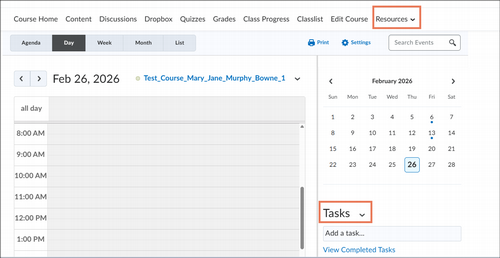
- Check daily: Open Brightspace, check your school email, and class announcements.
- If you have never used Brightspace as a learning management system (LMS), take some time to get to know it.
- The following student support materials may be helpful.
Technical Information
- Using Chrome or Firefox provides the best experience with Brightspace. You may have problems with some functions if you use Edge or Safari.
- For an online course, you should have a functioning web camera and microphone. You can check your camera and microphone using com. This is a free test site.
- There is an app for Brightspace called Brightspace Pulse. However, this is intended for quick checks only. It does not provide the full functionality of signing into the course through a browser. For using Brightspace in the way you need to for an online course, sign in through the MyScranton portal using Chrome or Firefox, even if you are on a phone or tablet.
- If you are working from a location off campus, you will need good internet connection, especially for synchronous sessions using Teams. You can check your internet speed with Fast.com. The goal speed is a minimum of 6 to 10 Mbps.
- When learning online, there is an increased need for personal responsibility and time management.
- Participation is different than an in-person course and may require more reading, writing, and self-study.
- It may take more effort to connect with classmates and the instructor.
- You will need to use a variety of technology tools. Try them early before a due date, check the student resources provided, and ask for help if you need it.
- Treat your peers and instructors with the same respect online that you would in-person. Be aware that being online can provide a false sense of anonymity which can lower your sense of accountability and social restraint.
- Use proper formatting, punctuation, and grammar. Communication in an online course should be at the same level of academic writing as used for an in-person course. Text-style writing is generally not appropriate.
- Remember that humor and sarcasm can be misinterpreted online.
- When participating in online discussions, think in terms of extending the conversation, rather than just completing an assignment. Avoid posting on the last day when there is little opportunity for a back-and-forth conversation.
- If your instructor offers office hours, do not feel like you need a specific question or problem to discuss to join. Joining office hours also provides the opportunity for you to develop a connection with the instructor and in an online course, those opportunities are limited.
- Find ways to connect with other students taking the course. Join the class WhatsApp or open discussion forum. If you are struggling with something in the course, often peers can provide some helpful suggestions or support.
- Consider creating a personalized learning plan for the course. When will you study? Where will you study? When will you begin to prepare for an exam? How can you break down major assignments into manageable chunks?
- If there are rubrics, use them. They are an excellent way to determine the expectations for an assignment.
- Ask questions. If you are unsure of something, others are likely unclear as well. It is much more challenging for your instructor to gauge if a class is mastering a topic when teaching online. Don’t be afraid to let them know.